Hardware : 3COM HUB
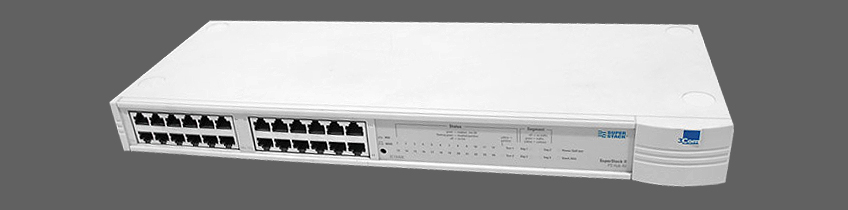
3Com SuperStack II Dual Speed 24-Port Ethernet Hub (3C16593A)
The SuperStack® II Baseline Dual Speed Hub is an easy-to-use,
10/100 autosensing Class II hub (repeater). It is ideal for users who
want to connect both Ethernet and Fast Ethernet devices
(workstations and other equipment) to the same hub.
All ports on the Baseline Dual Speed Hub are half duplex,
autosensing 10 Mbps and 100 Mbps. Each port senses the speed of
the connected equipment and operates at the appropriate speed.
The Baseline Dual Speed Hub comes with:
-
One power cord for use with the Baseline Dual Speed Hub
-
Four full height and two reduced height, self-adhesive rubber
pads -
One rack mounting kit
-
A Registration Card and Envelope for you to fill in and return
A Guide Book
The Baseline Dual Speed Hub is suitable for office use where it can
be free standing or rack-mounted (in a wiring closet or equipment
room). The hub can be powered either from the AC mains supply, or
through an optional 3Com® SuperStack II Advanced Redundant
Power System (3C16071A).
Network Connections
The Baseline Dual Speed Hub has 12 or 24 shielded RJ-45, 10/100
autosensing ports on the front panel. Each port can be connected to
either a 10BASE-T (Ethernet) or a 100BASE-TX (Fast Ethernet) device.
Internally, the hub has two repeater segments (10 Mbps and
100 Mbps) which are linked by a switch, allowing connected
10 Mbps and 100 Mbps devices to communicate.
You can connect a 10BASE-T or 100BASE-TX hub or switch to the
Baseline Dual Speed Hub.
Status LEDs
The Status LEDs show the state of a port and whether or not the
Link Pulse signal is present on the segment connected to a port:
Green : A 100 Mbps Link Pulse signal is being received and the 100BASE-TX segment attached to the port
is functional.
Yellow : A 10 Mbps Link Pulse signal is being received and the 10BASE-T segment attached to the port is functional.
Flashing : The port has partitioned, due to an excessive number of collisions, excessively long collisions, or a network loop. To remove a network loop, examine your connections and ensure that each piece of equipment is connected to your network by only one connection.
Off : The Link Pulse signal is not being received. Either nothing is connected to the port, or there is a problem:
- Check that the attached device is powered on.
- Check that the cable is the correct type and is not
faulty.
Segment LEDs
The Segment LEDs indicate activity on the 10 Mbps and 100 Mbps segments:
Flashing green : Packets are being received or transmitted.
Flashing yellow : Collisions are occurring on the segment. A low level of collisions is a part of normal Ethernet and Fast Ethernet operation. Excessive collisions may indicate a network problem.
Off : No packets are being received or transmitted on the segment.
Power LED
The Power LED indicates a number of conditions:
Green : The unit is powered on and ready for use.
Off : The unit is powered off.
If the power cable is connected correctly, there may be a problem with the fuse within the power cord’s plug.
Technical Information
The SuperStack® II Baseline Dual Speed Hub has been designed and certified to the following standards:
Functiona : lISO/IEC 8802-3, IEEE 802.3, IEEE 802.3u, IEEE 802.1D
Safety : UL 1950, EN 60950, CSA 22.2#950, IEC 60950
EMC : EN 55022 Class B*, VCCI Class B*, AS/NZS3548 Class B*, FCC Part 15 Class A, ICES-003 Class A
Immunity : EN 50082-1 (IEC801 Parts 2–5)
Operating Temperature: 0–50°C (32–122°F)
Humidity : 0–95% (non-condensing)
Width : 440 mm (17.3 in.)
Depth : 173 mm (6.8 in.)
Height : 44 mm (1.7 in.) or 1U
Weight :
3C16592A: 2.22 kg (4.90 lb)
3C16593A: 2.10 kg (4.63 lb)
Mounting : Free standing, or 19-in. rack mounted using the mounting kit supplied
Power Inlet IEC 320
AC Line Frequency 50/60 Hz
Power Consumption 3C16592A: 25 VA
3C16593A: 42 VA
Power Dissipation 3C16592A: 86 BTU/hr
3C16593A: 142 BTU/hr
Input Voltage 100–240 VAC
Current Rating 3C16592A: 1.0 A (maximum)
3C16593A: 1.0 A (maximum)
Technical Support